
Business Email in Uzbekistan: An IT Checklist
A technical checklist for developers and administrators evaluating an email service in Uzbekistan, preparing DNS, and accepting a migration.

Contents
- 1. Establish domain and DNS ownership
- What to check specifically in Uzbekistan
- 2. Map email identities
- 3. Find every outgoing system
- 4. Verify the DNS record set
- 5. Test client access before production traffic
- 6. Separate MX switchover from archive migration
- 7. Define acceptance criteria
- Responsibilities during Mailcore setup
- Mailcore's plan and intended scenario
- What to send for technical assessment
- Sources
When a developer or system administrator is asked to find business email in Uzbekistan, the task rarely ends with creating mailboxes. You need to identify DNS ownership, every system already sending for the domain, the plan for old archives, and the tests that will accept the new service.
This technical route runs from inventory to MX switchover. It suits an internal IT specialist, external administrator, or web agency responsible for a client's domain. Mailcore can be connected without operating a mail server yourself: the service prepares email infrastructure while the company retains domain and business-dependency control.
Use this for pre-sales evaluation and requirements. Once a provider is selected, continue with domain email setup, a safe MX change, SPF, DKIM, and DMARC, and archive migration.
1. Establish domain and DNS ownership
The registrar, authoritative DNS, web host, and email service can all be different providers. First determine:
- where the domain is registered and when it renews;
- which NS records are published and where the real zone is edited;
- who has administrative DNS access;
- current MX records and priorities;
- who will be available during the switchover window.
Mailcore does not require a domain transfer or registrar password. A specialist prepares exact values; the zone owner or administrator enters them at the agreed time.
Inspect public DNS, not only the panel. Capture nslookup -type=mx company.uz or the equivalent dig result. Save current values and TTL for rollback.
What to check specifically in Uzbekistan
Record local operating terms alongside protocols. Confirm billing in Uzbek soum, the contracting party and closing documents, support language and hours, and availability in the company's time zone. For a .uz domain, determine separately who manages registration and the actual DNS zone.
Do not infer data location from latency or TAS-IX connectivity. Request the storage, backup, and external-gateway architecture. Outgoing mail may pass through another provider and then the recipient's infrastructure abroad. If locality is mandatory, document every component rather than accepting “server in Uzbekistan.”
Our guide to choosing email hosting in Uzbekistan covers these service and billing questions.
2. Map email identities
Export or compile every object that must continue working:
- employee mailboxes;
- role addresses
info@,sales@,support@, andbilling@; - aliases and forwarding;
- shared and department mailboxes;
- technical addresses for websites, monitoring, and notifications;
- recovery addresses for banking, CRM, and advertising accounts.
For each item, record owner, separate sign-in, current size, and migration need. An alias is not a mailbox: it has no independent storage or login history. Agree that distinction before calculating the plan.
3. Find every outgoing system
A forgotten sender is the most common post-migration problem. User email works, but the website, CRM, or invoicing service still sends through the old route or begins failing DMARC.
Create a flow register:
| Source | Purpose | Technical domain | Expected volume |
|---|---|---|---|
| Email clients | Operational correspondence | Company domain | low |
| Website | Enquiries and notifications | Check From and envelope-from | low |
| CRM | Deals and automated email | Check DKIM and return-path | medium |
| Campaigns | Marketing | Prefer a separated stream | high |
Use each external service's official SPF and DKIM requirements. Do not add a second SPF TXT record; merge permitted sources into one policy within the DNS lookup limit. Tighten DMARC only after every legitimate flow is found and tested.
4. Verify the DNS record set
The records have different roles:
- MX routes new incoming messages;
- SPF lists permitted sources for envelope-from;
- DKIM verifies a message signature;
- DMARC aligns SPF or DKIM with the visible From domain;
- A/AAAA and PTR contribute to mail-node identity.
Mailcore prepares MX, SPF, DKIM, and DMARC for the domain's actual design instead of issuing one universal template. The client must disclose all external senders and leave records unchanged until the agreed window.
After publication, query authoritative servers and several independent resolvers. The panel may show the new value while cached resolvers still return the old one, so keep the previous email environment accessible during transition.
5. Test client access before production traffic
For each prepared mailbox, verify:
- Webmail sign-in.
- Encrypted IMAP access.
- Authenticated SMTP sending.
- Secure transfer or replacement of the initial password.
- At least one desktop or mobile client in real use.
Mailcore provides webmail, IMAP, and SMTP. Clients receive exact server names, ports, and encryption modes. Distribute these in an employee guide without including passwords.
6. Separate MX switchover from archive migration
MX routes new incoming messages and does not copy existing folders. With source IMAP, a two-pass migration is practical: synchronize most data before the switch, then make a final pass afterward.
Collect occupied size, large folders, and local archives for every mailbox. Contacts, calendars, rules, and signatures may live outside IMAP. Mailcore assesses the available migration and cost from the actual data.
Retire the source only after mailbox owners reconcile it. If an archive exceeds the new quota, agree which part remains operational and where history is kept.
7. Define acceptance criteria
Before changing production MX, prepare a short protocol:
- every agreed address exists and passes local tests;
- an external address reaches a new mailbox;
- the new mailbox replies to an external recipient;
- headers show expected SPF, DKIM, and DMARC;
- webmail, IMAP, and SMTP work in used clients;
- the backup environment passed a control restore;
- old DNS values and rollback steps are saved;
- the old server remains available through observation.
Recipients make the final filtering decision, but correct records and control sending eliminate basic identity faults and provide reproducible diagnostic evidence.
Responsibilities during Mailcore setup
| Mailcore | IT specialist or domain owner |
|---|---|
| Reviews current email records | Confirms access to the actual DNS zone |
| Prepares MX, SPF, DKIM, and DMARC | Lists website, CRM, and other senders |
| Creates agreed mailboxes | Confirms users and role addresses |
| Supplies webmail, IMAP, and SMTP settings | Distributes employee access securely |
| Participates in control tests | Enters DNS records in the agreed window |
| Plans migration after archive assessment | Keeps the old service until acceptance |
This division preserves the client's domain control without leaving its administrator alone with mail infrastructure.
Mailcore's plan and intended scenario
Mailcore serves small teams that need managed domain email without a dedicated email administrator. The pilot costs UZS 59,000 per month for one domain and five 1 GB mailboxes, plus UZS 8,000 per month for each additional 1 GB mailbox.
Documents, calendars, and meetings can remain in existing tools because Mailcore handles the email layer. Mandatory MFA, SLA, retention, and data-location requirements are captured at the start so the available configuration is confirmed before payment.
What to send for technical assessment
For an initial response, provide the domain, mailbox count, current provider, approximate archive size, and external senders. Mailcore will inspect public DNS, ask clarifying questions, and prepare a quote and transition sequence without changing production records.
Submit the domain for review and receive a technical plan
Sources
Related reading
 Guides
How Mailcore Connects a Domain: From Request to Working Email
Inside Mailcore's guided setup: domain review, mailbox preparation, a safe MX change, and control messages.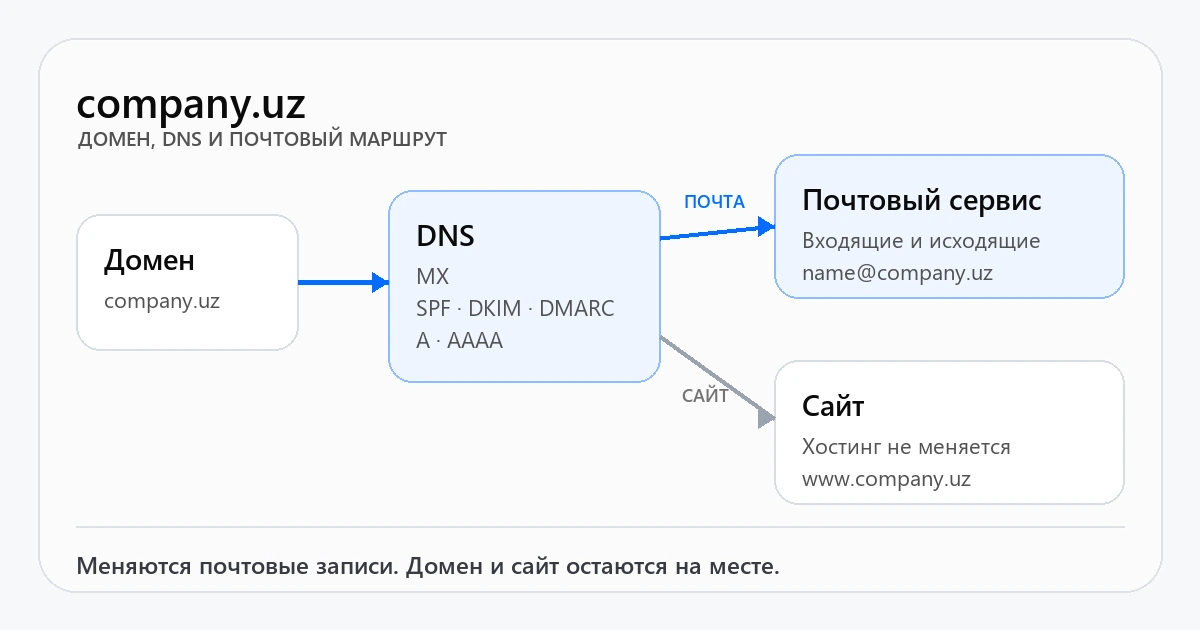 Guides
How to Connect Email to Your Domain: Step-by-Step
After choosing a provider, prepare the domain, obtain MX, SPF, DKIM, and DMARC records, switch the route, and put the service into operation. Guides
How an Office Manager Can Choose Business Email
A step-by-step checklist for office managers: what information to collect, what to ask providers, and how to present the price and launch plan.Get a setup plan and exact estimate
Send us your domain, number of mailboxes and approximate archive size. We will review the current setup and agree on a safe migration before any DNS changes.